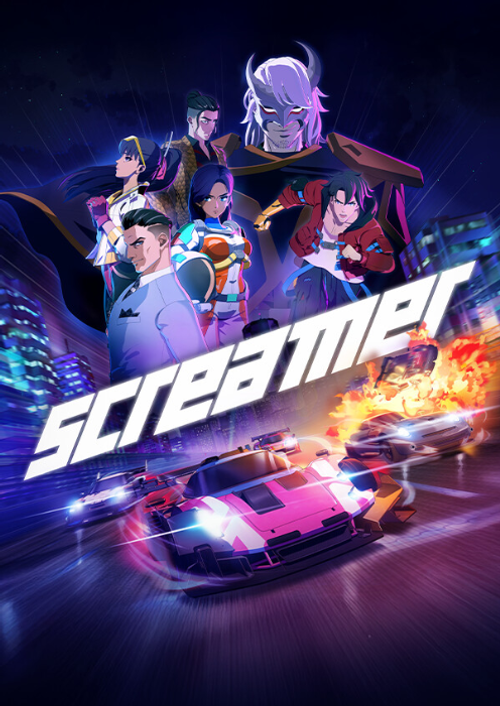
Screamer

OS: Xbox Series X|S / PC · Optimised for Xbox Series X|S?: Yes · Subscription: Online multiplayer on console requires Xbox Game Pass Essential, Premium or Ultimate (subscriptions sold separately). · Other: Internet Access


 + mange flere
- Certificeret sælgerOfficielle koder fra brands
- Sikker betalingVælg mellem mange muligheder
- Øjeblikkelig leveringPå under 2 minutter



Beskrivelse
ABOUT THE GAME
A reason to race
Longing, ambition, vengeance. Everyone has a reason to enter the Screamer tournament, and no one’s backing down. Join the competition and race side by side with fearless drivers, ready to push past every limit to chase what they believe in.
The Screamers
Five teams. Five reasons to risk it all – on and off the track. Soldiers, scientists, criminals, superstars, and ruthless magnates. Different paths now converging on a single focal point: the Screamer tournament. Led by a mysterious master, this merciless competition will be the key to each participant’s personal goals. Choose your driver wisely: each one steers a vehicle that mirrors their style, with a bespoke design and a unique ability that gives them an edge in this brutal showdown.
A unique style
The stage of the most lethal races, this arcade racing game plunges you into a futuristic universe brimming with 90s anime vibes. Step into a neon-lit world and speed across tracks where the adrenaline is always high!
The ECHO
Mysterious tech that changed racing forever: the ECHO. Thanks to it, cars don’t just race – they fight! Push them past the edge again and again. Juggle between Boost, Strike, and Shield to stay in the lead, unleashing blistering bursts of speed and well-placed hits to knock your rivals off the track. And once Overdrive kicks in, it’s full-throttle chaos: no mercy, no brakes, and no room for anyone in your path. Master the ECHO power and you’ll become a real Screamer!
Different ways to race
A Screamer needs to be ready for any kind of challenge, and being the fastest isn’t always enough. Among the various game modes, you’ll find Team Races where crossing the finish line is just as important as taking down your opponents, while in others, the key is staying in Overdrive for as long as possible. Prove you’re the best no matter what challenge stands in your way, as well as online and in split-screen mode!
Indløs
HOW TO REDEEM XBOX PLAY ANYWHERE GAME CODE
Xbox One Console / Xbox Series X|S Console:
- Sign in to your Xbox One / Xbox Series X|S (make sure you’re signed in with the Microsoft account you want to redeem the code with)
- Press the Xbox button on the controller to open the guide, and then select Store.
- Press the View button on the controller to open the side menu, and then select Redeem.
- Enter your unique code that you received from TokenStore and select Next, and then follow the prompts.
Xbox 360 Console:
- Sign in to your Xbox 360 (make sure you’re signed in with the Microsoft account you want to redeem the code with)
- Press the Guide button on your controller
- Select Games & Apps, and then select Redeem Code.
- Enter your unique code that you received from TokenStore and then follow the prompts.
Web Browser:
- On your PC or phone’s browser, navigate to https://redeem.microsoft.com
- Sign in with your Microsoft account credentials (make sure you’re signed in with the Microsoft account you want to redeem the code with).
- Enter your unique code that you received from TokenStore and select Next, and then follow the prompts.
Microsoft Store on Windows:
- On your PC, press the Start button , and then enter the store into the search bar.
- Choose Microsoft Store from the results to open the app and sign in with your Microsoft account credentials (make sure you’re signed in with the Microsoft account you want to redeem the code with).
- Select your account in the top-right corner of the screen, and then select Redeem code or gift cards.
- Enter your unique code that you received from TokenStore and select Next, and then follow the prompts.
Xbox App for Windows (ONLY PC):
- On your PC, press the Start button , and then enter Xbox into the search bar.
- Choose the Xbox app from the results to open the app and sign in with your Microsoft account credentials (make sure you’re signed in with the Microsoft account you want to redeem the code with)
- Select your gamerpic, and then select Settings.
- Select Redeem under Redeem a code.
- Enter your unique code that you received from TokenStore and select Next and then follow the prompts.